1
/
of
6
Senior Space
Activity Calendar Template | Editable Monthly PowerPoint Calendar | Publisher Alternative | 2 Styles, 2 Sizes
Activity Calendar Template | Editable Monthly PowerPoint Calendar | Publisher Alternative | 2 Styles, 2 Sizes
Regular price
$5.00 USD
Regular price
Sale price
$5.00 USD
Couldn't load pickup availability
⚠ Duplicate - remove this block
Publisher is retiring. Your activity calendar doesn't have to retire with it.
Editable monthly activity calendar template for senior living communities, nursing homes, assisted living, memory care and adult day programs.
Also great for schools, day care programs, or community centers. Works in PowerPoint — the program you already have. Two design styles and two print sizes, ready the moment you download.
If you've been building your monthly calendar in Microsoft Publisher, you already know it's being discontinued. This template moves that whole job into PowerPoint, with no new software to learn and no design experience needed.
WHAT YOU GET — 4 FILES, ONE DOWNLOAD
• Classic style — warm and understated, easy to get approved by corporate
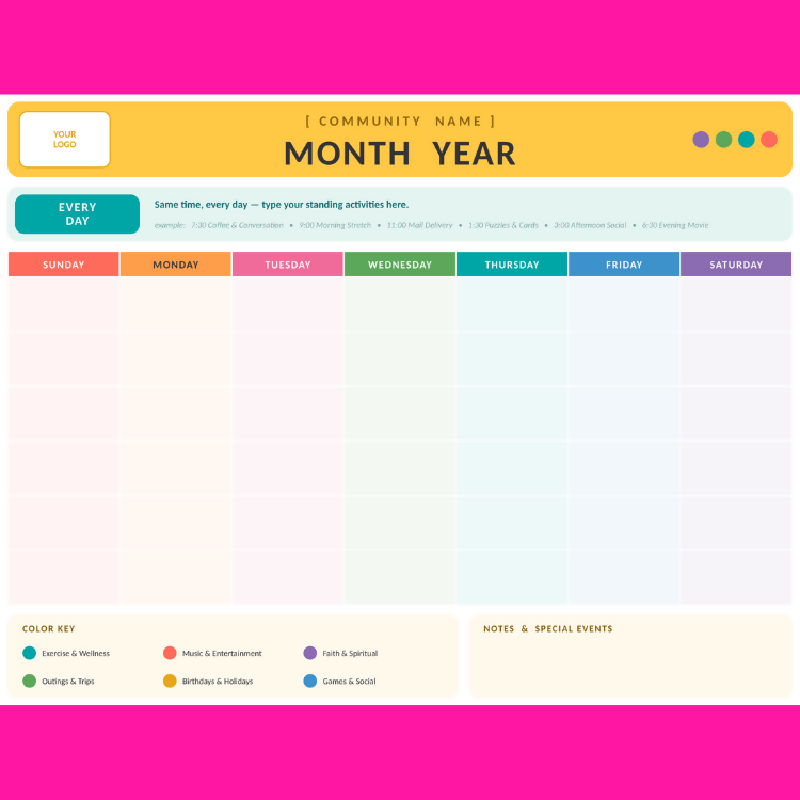
• Bright style — a color for every weekday, easy for residents to follow at a glance
• Each style in 8.5 x 11 (letter) and 11 x 17 (tabloid)
• A step-by-step instructions page inside every file
BUILT BY REQUEST, FOR ACTIVITY DIRECTORS
• Blank and reusable — works for any month, any year. Six week rows, so it doesn't matter what day the 1st lands on.
• An EVERY DAY block at the top — type your standing activities once instead of writing them into all 30 boxes.
• Room for your logo — drop your community's logo into the header.
• Color-coded categories — exercise, music, spiritual, outings, birthdays, games. Relabel and recolor them however you like.
• Notes & special events box — birthdays, holidays, announcements.
• Real PowerPoint tables — press Tab to move day to day, and column widths resize together.
• All background colors, border colors and fonts can be changed by you for your community branding or preference.
HOW IT WORKS
1. Download and open in PowerPoint
2. Type your community name and the month
3. Fill in the days and print
Print it at the desk on a regular printer, post the big version on the activity board, or save as PDF to email families.
IMPORTANT DETAILS
• This is a digital download. No physical item is shipped.
• Requires Microsoft PowerPoint (desktop). It also opens in Google Slides after uploading to Google Drive, with minor formatting differences.
• Fonts used are Calibri and Cambria, which ship with Microsoft Office. CHANGE AS NEEDED.
• For personal and single-community use. Please don't resell or redistribute the files.
Share