1
/
of
9
Senior Space
Activity Participation Tracker Excel, Activity Director Tool, Resident Engagement Spreadsheet
Activity Participation Tracker Excel, Activity Director Tool, Resident Engagement Spreadsheet
Regular price
$9.99 USD
Regular price
Sale price
$9.99 USD
Couldn't load pickup availability
⚠ Duplicate - remove this block
The participation documentation surveyors want, in one Excel template. Track resident attendance and engagement, auto-generate monthly reports.
DESCRIPTION
Track resident activity participation, engagement, cognition, and social levels all in one workbook — no complicated software needed, just Microsoft Excel.
This template was designed for activity directors, Life Enrichment directors, recreation staff, and care facility administrators who need a clean, reliable way to document daily resident participation and generate monthly reports ready for review or audit.
________________________________________
WHAT'S INCLUDED
One Excel file (.xlsx) containing 36 sheets:
• Instructions and Reference Guide Tab
• Roster sheet for resident names, room numbers, and the month/year selector
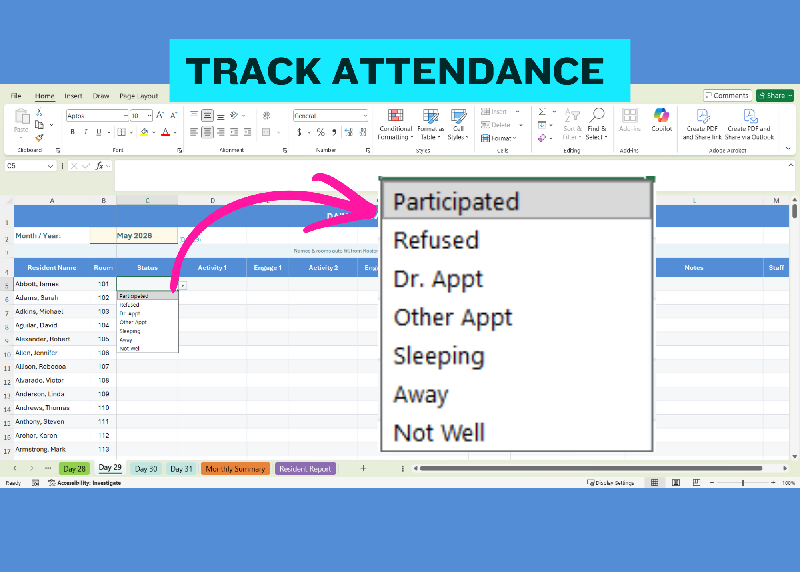
• 31 Daily Activity Logs (Day 1 through Day 31) with dropdown menus for fast data entry
• Monthly Summary with automatic facility-wide totals and activity percentages
• Individual Resident Report that filters all data to one resident at the click of a dropdown
________________________________________
HOW IT WORKS
Enter your residents on the Roster sheet. Their names and room numbers automatically populate across all 31 daily logs. Each day, staff select from dropdown menus to record participation status, up to five activities with engagement levels, cognition, social level, and notes.
Everything flows into the Monthly Summary and Resident Report automatically — no manual counting, no copy-pasting between sheets.
________________________________________
DROPDOWN MENU OPTIONS
• Activities: Exercise/Fitness, Music/Sing-Along, Arts & Crafts, Bingo/Games, Social Hour, Religious/Spiritual, Movie/Film, Cooking/Baking, Gardening, Pet Therapy, Reminiscence, Educational, Holiday Event, Sensory Program, Outing/Trip, Current Events, Word Games, Active Game, Reading, Puzzles/Crosswords, Walking, Watching TV, Writing/Journaling, Knitting/Crochet, Coloring/Drawing, Listening to Music, Phone/Video Call, Meditation/Prayer, Card Games
• Status: Participated, Refused, Dr. Appt, Other Appt, Sleeping, Away, Not Well
• Engagement: Active, Minimal, Passive, N/A
• Social: Very Social, Social, Quiet but Present, Withdrawn, Engaged Non-Verbal, N/A
• Cognition: Intact, Mild Impairment, Moderate Impairment, Severe Impairment
________________________________________
FEATURES
• Holds up to 301 residents per workbook
• Dropdown menus on every daily log for fast, consistent data entry
• Auto-fill resident names and rooms across all 31 days from a single roster
• Monthly Summary counts participation, engagement, and activity types automatically with percentages
• Individual Resident Report with a name selector dropdown for per-person analysis
• Change the month by editing one cell and the entire workbook updates
• Formulas are protected so staff cannot accidentally overwrite them
• Buyers can customize fonts, colors, and cell formatting to match their facility branding
• Reusable month after month — save a fresh copy for each new month
________________________________________
REQUIREMENTS
This template requires Microsoft Excel (desktop version for Windows or Mac). It is NOT compatible with Google Sheets, Apple Numbers, or Excel Online due to cross-sheet formulas and data validation features that do not transfer to those platforms.
________________________________________
HOW TO REUSE EACH MONTH
Save a new copy of the file for each month. Open the fresh copy, change the date in Roster cell B2 to the new month, and start logging. Your previous month's data stays safe in its own file.
________________________________________
PROTECTION & DISCLAIMER
This workbook has been delivered in full working condition with all formulas, dropdowns, and cross-sheet references tested and verified. Each sheet is protected to prevent accidental changes to formulas and structure. The workbook structure is password-protected (password will be delivered within the workbook on the “Instructions” sheet).
You are welcome to unprotect and customize, but any modifications to formulas, sheet names, or workbook structure are made at your own risk. The seller is not responsible for issues arising from buyer modifications. No refunds or support for altered workbooks.
________________________________________
DELIVERY
This is a digital download. No physical item will be shipped. Your file will be available for download immediately after purchase.
Share