1
/
of
9
Senior Space
Attendance Billing Spreadsheet, 15 Minute Unit Tracker, Activity Attendance Excel Template, Medicaid Billing Tool, Auto Calculate Hours
Attendance Billing Spreadsheet, 15 Minute Unit Tracker, Activity Attendance Excel Template, Medicaid Billing Tool, Auto Calculate Hours
Regular price
$4.99 USD
Regular price
Sale price
$4.99 USD
Couldn't load pickup availability
⚠ Duplicate - remove this block
⭐Stop hand‑calculating billable units!
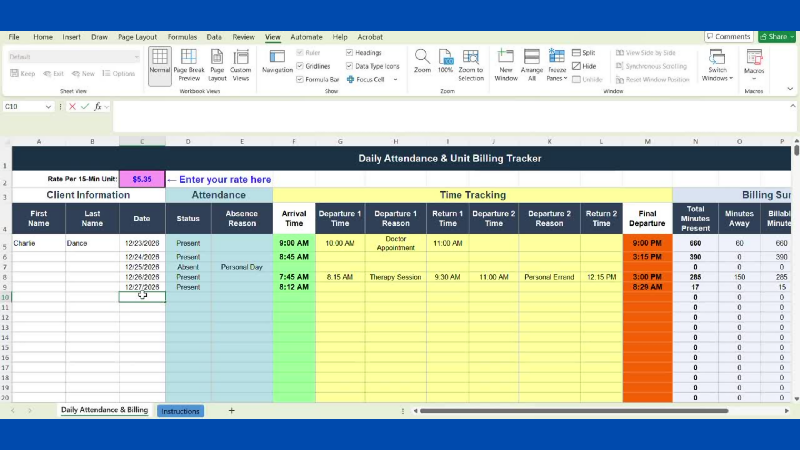
This powerful Excel tracker instantly converts arrival/departure times into accurate 15‑minute billing units — perfect for adult day programs, home care, respite, and therapy providers who bill Medicaid or private pay.. Enter times → billing calculates automatically. No formulas, no math, no stress.
Fast. Accurate. Medicaid‑friendly.
⭐ DAILY ATTENDANCE & UNIT BILLING TRACKER (Excel)
Billable Units… Calculated *For You.* Every Time.
Say goodbye to hand‑math, guesswork, and inconsistent billing.
This powerful Excel tracker instantly converts time in/out into **accurate 15‑minute billable units** — perfect for adult day programs, home care, respite, therapy sessions, and any service billed in quarter‑hour increments.
If you track attendance, minutes present, or Medicaid‑style units… this sheet will change your workflow.
---
✨ WHY YOU’LL LOVE IT
- Enter **ANY** arrival/departure time — even odd times like *9:07 AM to 2:43 PM*
- Automatically calculates **total minutes present**
- Rounds down to **billable 15‑minute units**
- Multiplies units by **your custom rate**
- Tracks **up to 2 mid‑day departures/returns**
- Includes **absence tracking** with reason DROP-DOWN
- Bottom **TOTALS row** makes invoicing fast and foolproof
This is your new “no more calculator” system.
---
📦 WHAT YOU GET
- **1 Excel file (.xlsx)** — instant digital download
- Main tracking sheet with **364 rows** (use for a full year per client *or* multiple clients per day)
- Built‑in **Instructions** sheet with step‑by‑step setup
- Pre‑built dropdowns for:
- Present/Absent
- Absence Reasons
- Departure Reasons
Everything is ready to use the moment you open it.
---
🧠 HOW IT WORKS
1. Set your **rate per 15‑minute unit**
2. Enter client name + date
3. Choose Present/Absent
4. Enter arrival + final departure
5. Add any mid‑day leave/return times
6. Watch the billing calculate automatically
Two ways to organize your workflow:
- **OPTION A — One sheet per day:** Track all clients for that date
- **OPTION B — One sheet per person:** Track one client’s entire year
Both methods work beautifully.
---
👥 PERFECT FOR
- Adult Day Care & Adult Day Health
- Home Care Agencies
- Independent Caregivers
- Respite Providers
- OT / PT / Speech Therapy
- Small facilities without expensive billing software
- Anyone billing Medicaid, insurance, or private pay by the unit
If you bill in 15‑minute increments, this tool was built for you.
👥 PERFECT FOR
- Adult Day Care & Adult Day Health
- Home Care Agencies
- Independent Caregivers
- Respite Providers
- OT / PT / Speech Therapy
- Small facilities without expensive billing software
- Anyone billing Medicaid, insurance, or private pay by the unit
If you bill in 15‑minute increments, this tool was built for you.
Q: Can I get a refund? A: Due to the digital nature of this product, all sales are final.
📌 IMPORTANT NOTES
- Digital download only — no physical item
- Best performance in **Microsoft Excel**
- Instructions included inside the file
- Due to the digital nature of this product, all sales are final
---
🛑 TERMS OF USE
For personal or single‑business use.
You may print unlimited copies for your organization.
Not for resale, redistribution, or sharing.
If someone else needs a copy, please direct them to this listing.
Your purchase supports a small creator 💛
FAQ SECTION
Q: Does this work in Google Sheets? A: Yes! Import the .xlsx file into Google Sheets and the formulas will work. Formatting may shift slightly but all the calculations function the same.
Q: Can I add more rows? A: The tracker comes with 356 rows, which is enough for every day of the year.
Q: Do I have to enter times on the quarter hour? A: No. You can enter any time (9:07 AM, 2:43 PM, etc.) and the tracker will calculate correctly. It rounds billing down to the nearest 15-minute increment automatically.
Q: Can I change the rate per unit? A: Yes. Your rate is entered in one cell at the top of the sheet and applies to all rows. Change it anytime.
Q: Can I use one sheet for multiple clients? A: Yes. You can enter different clients on different rows within the same sheet, or copy the sheet to create one tab per client — whatever works for your workflow.
Q: Can I print this? A: Yes. It's formatted for US Letter size (8.5 × 11). You may want to print in landscape orientation for the best fit.
Q: I accidentally typed over a formula. What do I do? A: The formula cells are protected, so this shouldn't happen.
Q: Can I get a refund? A: Due to the digital nature of this product, all sales are final.
Keywords: attendance billing spreadsheet, 15 minute unit tracker, Medicaid billing Excel template, adult day care billing, billable units calculator, attendance tracker for activity directors, Medicaid unit billing tool, adult day program attendance log, respite care billing spreadsheet, therapy billing template, home care attendance Excel, auto-calculate billable hours, daily attendance Excel template, activity director Excel tools, adult day services billing, 15-minute increment billing, Medicaid attendance form, activity attendance tracker, billing spreadsheet for caregivers, ADHC billing template.
Share