1
/
of
9
Senior Space
MDS Care Plan Tracker Excel Template | Nursing Home mds Coordinator Tool | R.A.I Schedule, Due Dates, Dashboard | SNF LTC
MDS Care Plan Tracker Excel Template | Nursing Home mds Coordinator Tool | R.A.I Schedule, Due Dates, Dashboard | SNF LTC
Regular price
$7.99 USD
Regular price
Sale price
$7.99 USD
Couldn't load pickup availability
⚠ Duplicate - remove this block
MDS & CARE PLAN TRACKER — THE EXCEL TOOL EVERY CARE PROFESSIONAL NEEDS
If you're an MDS coordinator, Director of Nursing, Activity Director or care plan coordinator, you already know the problem: MDS due dates and care plan deadlines pile up fast. One missed assessment can mean a survey tag, a Five-Star hit, or a billing problem. This tracker fixes that.
Type your residents in once. The spreadsheet does the math.
*** WHAT IT DOES ***
* Auto-calculates MDS due dates from your Last MDS Date using the standard 92-day RAI cycle.
* Auto-calculates care plan due dates (default 7 days after the MDS).
* Flags every resident as Overdue, Due Soon, Scheduled, Completed, or Discharged.
* Handles new admissions automatically (14-day admission MDS window).
* Handles Significant Changes (SCSA) with a dedicated override column.
* Shows your full workload at a glance on a one-tab Dashboard: total residents, active vs. discharged, Long-Term vs. Rehab census, MDS status, care plan status, and upcoming items due in 7, 14, or 30 days.
* Sortable and filterable — bring the most urgent residents to the top with one click.
*** WHAT'S INCLUDED ***
* Resident Tracker Tab: 400 resident rows (expands automatically if you need more).
* Dashboard Tab: Live workload and compliance summary.
* Settings Tab: Change the 92-day MDS cycle, 14-day admission window, 7-day care plan lead time, or 14-day "Due Soon" warning window to match your facility policy.
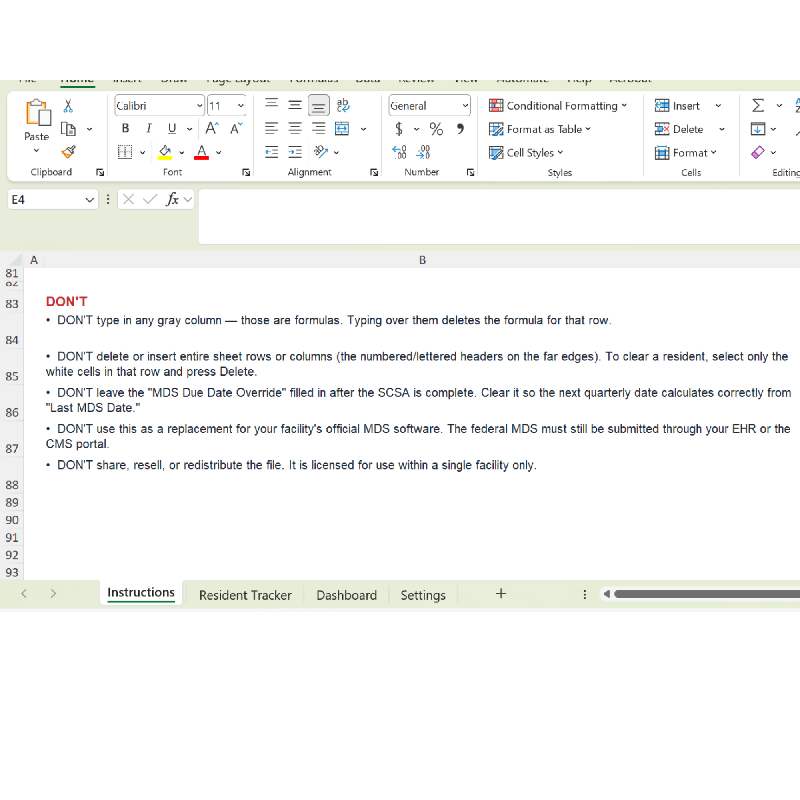
* Instructions Tab: Full step-by-step guide and do's and don'ts.
* 5 Example Residents: Built-in to show you how the tracker behaves with different scenarios (quarterly, annual, new admission, SCSA, completed cycle).
*** WHO IT'S FOR ***
* MDS Coordinators
* Directors of Nursing (DON) and Assistant DONs
* Activity Directors
* Care Plan Coordinators
* Nursing Home Administrators
* QAPI / Quality Assurance Directors
* Skilled nursing facilities, long-term care facilities, and sub-acute rehab units
*** WHAT YOU GET ***
One .xlsx file — instant download. Works in Microsoft Excel (Windows, Mac, Excel for the web). Also works in Google Sheets and LibreOffice Calc, with minor formula display differences possible.
*** IMPORTANT — PLEASE READ BEFORE BUYING ***
FULL CUSTOMIZATION & FORMULAS: Cells are not locked or password-protected. This is intentional — you have full access to every formula, every column, and every setting so you can customize the file to fit your facility exactly. The trade-off is that any user can also accidentally overwrite a formula. The Instructions tab clearly marks which columns are formulas (gray) and which are for typing (white). Buyers are responsible for following the instructions and for keeping a backup copy of the original file.
SCHEDULING AID ONLY: This is a scheduling aid — not official MDS submission software. The federal MDS must still be submitted through your facility's EHR or the CMS portal. Always follow your facility policy and the federal RAI schedule.
LICENSING: Licensed for use within a single facility. Please don't share, resell, or redistribute the file.
*** SAVE HOURS EVERY WEEK ***
No more cross-checking the MDS calendar against a paper census. No more discovering an overdue assessment the day before the surveyor arrives. Buy once, use forever.
* Auto-calculates MDS and care plan due dates from the 92-day RAI cycle.
* Color-coded status: Overdue, Due Soon, Scheduled, Completed, Discharged.
* Built-in Dashboard with census, MDS status, care plan status, and 7 / 14 / 30-day workload forecasting.
* Handles multi-scenario tracking: New admissions, quarterlies, annuals, and Significant Change (SCSA) overrides.
* Holds 400 residents — auto-expands if you need more.
* Editable Settings tab for facility-specific cycle lengths and warning windows.
* Full instructions and 5 example residents included.
* Instant digital download — no waiting, no shipping.
*** FREQUENTLY ASKED QUESTIONS ***
Q: What software do I need?
A: Microsoft Excel. The file also opens in Google Sheets and LibreOffice Calc, though some formatting may display slightly differently.
Q: How many residents does it hold?
A: 400 residents out of the box. If you need more, simply type into the row below the last entry and the table expands automatically.
Q: Does it submit MDS assessments to CMS?
A: No. This is a scheduling and tracking aid only. Official MDS submission must still go through your facility's EHR or the CMS portal.
Q: Can I change the 92-day cycle or the "Due Soon" window?
A: Yes. The Settings tab controls every calculation. Change the values there and every due date updates automatically.
Q: How does it handle Significant Change assessments?
A: There's a dedicated MDS Due Date Override column. Type the SCSA's due date in that column and the tracker uses it everywhere — status, care plan due date, days until due — until you clear it after completion.
Q: Are the cells locked?
A: No. All formulas are visible and editable so you can fully customize the file. Please save a backup copy of the original before you start typing. The Instructions tab explains which columns are formulas (do not type) and which are for data entry.
Q: Can I share this with other facilities?
A: No — the license is for use within a single facility. Each facility should purchase their own copy.
Q: Is this HIPAA compliant?
A: The file itself contains no PHI when delivered. Whether your use of the file is HIPAA-compliant depends on how you store, share, and back up the file at your facility, which is your facility's responsibility.
---
IMPORTANT REMINDER: This file is intentionally not password-protected. All formulas are visible and editable so you can customize the tracker to fit your facility. Before you make any changes, save a backup copy of the original file. If you accidentally overwrite a formula, you can restore it from your backup. The seller is not responsible for data loss, missed deadlines, or compliance issues arising from edits made to the file.
If you're an MDS coordinator, Director of Nursing, Activity Director or care plan coordinator, you already know the problem: MDS due dates and care plan deadlines pile up fast. One missed assessment can mean a survey tag, a Five-Star hit, or a billing problem. This tracker fixes that.
Type your residents in once. The spreadsheet does the math.
*** WHAT IT DOES ***
* Auto-calculates MDS due dates from your Last MDS Date using the standard 92-day RAI cycle.
* Auto-calculates care plan due dates (default 7 days after the MDS).
* Flags every resident as Overdue, Due Soon, Scheduled, Completed, or Discharged.
* Handles new admissions automatically (14-day admission MDS window).
* Handles Significant Changes (SCSA) with a dedicated override column.
* Shows your full workload at a glance on a one-tab Dashboard: total residents, active vs. discharged, Long-Term vs. Rehab census, MDS status, care plan status, and upcoming items due in 7, 14, or 30 days.
* Sortable and filterable — bring the most urgent residents to the top with one click.
*** WHAT'S INCLUDED ***
* Resident Tracker Tab: 400 resident rows (expands automatically if you need more).
* Dashboard Tab: Live workload and compliance summary.
* Settings Tab: Change the 92-day MDS cycle, 14-day admission window, 7-day care plan lead time, or 14-day "Due Soon" warning window to match your facility policy.
* Instructions Tab: Full step-by-step guide and do's and don'ts.
* 5 Example Residents: Built-in to show you how the tracker behaves with different scenarios (quarterly, annual, new admission, SCSA, completed cycle).
*** WHO IT'S FOR ***
* MDS Coordinators
* Directors of Nursing (DON) and Assistant DONs
* Activity Directors
* Care Plan Coordinators
* Nursing Home Administrators
* QAPI / Quality Assurance Directors
* Skilled nursing facilities, long-term care facilities, and sub-acute rehab units
*** WHAT YOU GET ***
One .xlsx file — instant download. Works in Microsoft Excel (Windows, Mac, Excel for the web). Also works in Google Sheets and LibreOffice Calc, with minor formula display differences possible.
*** IMPORTANT — PLEASE READ BEFORE BUYING ***
FULL CUSTOMIZATION & FORMULAS: Cells are not locked or password-protected. This is intentional — you have full access to every formula, every column, and every setting so you can customize the file to fit your facility exactly. The trade-off is that any user can also accidentally overwrite a formula. The Instructions tab clearly marks which columns are formulas (gray) and which are for typing (white). Buyers are responsible for following the instructions and for keeping a backup copy of the original file.
SCHEDULING AID ONLY: This is a scheduling aid — not official MDS submission software. The federal MDS must still be submitted through your facility's EHR or the CMS portal. Always follow your facility policy and the federal RAI schedule.
LICENSING: Licensed for use within a single facility. Please don't share, resell, or redistribute the file.
*** SAVE HOURS EVERY WEEK ***
No more cross-checking the MDS calendar against a paper census. No more discovering an overdue assessment the day before the surveyor arrives. Buy once, use forever.
* Auto-calculates MDS and care plan due dates from the 92-day RAI cycle.
* Color-coded status: Overdue, Due Soon, Scheduled, Completed, Discharged.
* Built-in Dashboard with census, MDS status, care plan status, and 7 / 14 / 30-day workload forecasting.
* Handles multi-scenario tracking: New admissions, quarterlies, annuals, and Significant Change (SCSA) overrides.
* Holds 400 residents — auto-expands if you need more.
* Editable Settings tab for facility-specific cycle lengths and warning windows.
* Full instructions and 5 example residents included.
* Instant digital download — no waiting, no shipping.
*** FREQUENTLY ASKED QUESTIONS ***
Q: What software do I need?
A: Microsoft Excel. The file also opens in Google Sheets and LibreOffice Calc, though some formatting may display slightly differently.
Q: How many residents does it hold?
A: 400 residents out of the box. If you need more, simply type into the row below the last entry and the table expands automatically.
Q: Does it submit MDS assessments to CMS?
A: No. This is a scheduling and tracking aid only. Official MDS submission must still go through your facility's EHR or the CMS portal.
Q: Can I change the 92-day cycle or the "Due Soon" window?
A: Yes. The Settings tab controls every calculation. Change the values there and every due date updates automatically.
Q: How does it handle Significant Change assessments?
A: There's a dedicated MDS Due Date Override column. Type the SCSA's due date in that column and the tracker uses it everywhere — status, care plan due date, days until due — until you clear it after completion.
Q: Are the cells locked?
A: No. All formulas are visible and editable so you can fully customize the file. Please save a backup copy of the original before you start typing. The Instructions tab explains which columns are formulas (do not type) and which are for data entry.
Q: Can I share this with other facilities?
A: No — the license is for use within a single facility. Each facility should purchase their own copy.
Q: Is this HIPAA compliant?
A: The file itself contains no PHI when delivered. Whether your use of the file is HIPAA-compliant depends on how you store, share, and back up the file at your facility, which is your facility's responsibility.
---
IMPORTANT REMINDER: This file is intentionally not password-protected. All formulas are visible and editable so you can customize the tracker to fit your facility. Before you make any changes, save a backup copy of the original file. If you accidentally overwrite a formula, you can restore it from your backup. The seller is not responsible for data loss, missed deadlines, or compliance issues arising from edits made to the file.
Share