Senior Space
Volunteer Hours Tracker & Schedule Spreadsheet | Excel Google Sheets | Nursing Home Senior Living Nonprofit Activities Director Template
Volunteer Hours Tracker & Schedule Spreadsheet | Excel Google Sheets | Nursing Home Senior Living Nonprofit Activities Director Template
Couldn't load pickup availability
Manage your entire volunteer program from one fully automated Excel spreadsheet — built specifically for activities directors, volunteer coordinators, and small nonprofits who need an actual working tool, not another printable PDF.
Enter each volunteer once in the Volunteer Directory, and their name flows into automated dropdown menus throughout the entire workbook. Schedule shifts on a visual monthly grid. Log hours as volunteers work — the Hours Summary and Area Summary tabs total everything automatically by volunteer, by month, and by department.
No formulas to write. No setup headaches. No math.
━━━━━━━━━━━━━━━━━━━━━━━━━━━━━━━━━━ ✨ WHAT'S INCLUDED — 6 CONNECTED TABS ✨ ━━━━━━━━━━━━━━━━━━━━━━━━━━━━━━━━━━
📋 1. VOLUNTEER DIRECTORY
Room for up to 100 volunteers with full contact info, emergency contacts, availability, status, t-shirt size, and primary area of service.
Automated counters at the bottom show your total, active, inactive, and on-leave volunteers instantly.
🗓️ 2. MONTHLY SCHEDULE
A beautiful, color-coded grid organized by department, with rows for every volunteer in each area.
Automated daily totals across the bottom show your coverage at a single glance.
The "Total Days" column automatically counts how many days each person is scheduled.
⏱️ 3. HOURS LOG
Massive 2,000-entry shift log featuring automated dropdown menus that pull names directly from your Directory (zero typos, zero mismatches!).
Just enter time in and time out — total hours calculate automatically.
📊 4. HOURS SUMMARY
A fully automated year-at-a-glance view of every volunteer's hours broken out by month, with year-end totals on the right.
Updates itself in real-time as you log shifts. Perfect for volunteer recognition and year-end awards!
🏢 5. AREA SUMMARY
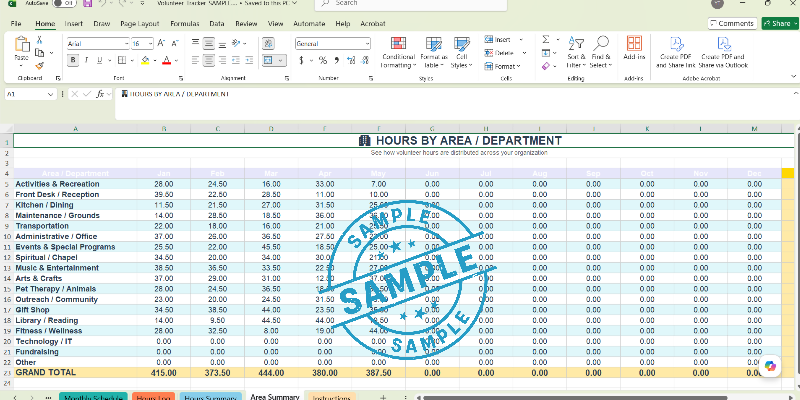
Automated total of volunteer hours by department for each month, plus a live count of how many volunteers worked in each area.
Ideal for grant reports and spotting coverage gaps.
📖 6. INSTRUCTIONS
Clear, step-by-step guide so anyone on your team can pick this up and use it with confidence.
━━━━━━━━━━━━━━━━━━━━━━━━━━━━━━━━━━ 🚀 WHY THIS ONE IS DIFFERENT 🚀 ━━━━━━━━━━━━━━━━━━━━━━━━━━━━━━━━━━
Most volunteer trackers on Etsy are printable PDFs you have to fill in by hand. This is a real, fully automated spreadsheet.
Names auto-fill from dropdowns.
Hours calculate automatically from time in/out.
The summary tabs read your log automatically.
You enter data once, and the totals update everywhere — directory, schedule, summary, and area breakdown.
━━━━━━━━━━━━━━━━━━━━━━━━━━━━━━━━━━ 🎯 PERFECT FOR: 🎯 ━━━━━━━━━━━━━━━━━━━━━━━━━━━━━━━━━━
🏠 Activities Directors at nursing homes, assisted living, and memory care facilities
👵 Senior Living and retirement community volunteer coordinators *🎨 Life Enrichment and recreational therapy programs
🕊️ Hospice and palliative care volunteer programs
⛪ Church volunteer ministries and lay leadership teams
🎗️ Nonprofit and charity volunteer coordinators
🏫 Schools, scout troops, PTAs, and community organizations
📝 Anyone tired of tracking volunteer hours on sticky notes and paper logs!
━━━━━━━━━━━━━━━━━━━━━━━━━━━━━━━━━━ 🛠️ HOW IT WORKS 🛠️ ━━━━━━━━━━━━━━━━━━━━━━━━━━━━━━━━━━
Open the file in Microsoft Excel or upload it directly to Google Sheets.
Enter your volunteers once in the Directory tab.
Build your schedule for the month on the Monthly Schedule grid.
Log shifts in the Hours Log as volunteers complete their work.
Open the Hours Summary or Area Summary any time — your totals are already there, calculated automatically!
━━━━━━━━━━━━━━━━━━━━━━━━━━━━━━━━━━ 💻 COMPATIBILITY 💻 ━━━━━━━━━━━━━━━━━━━━━━━━━━━━━━━━━━
Microsoft Excel (Windows, Mac, Web): Full, 100% automated functionality.
Google Sheets: Simply go to File → Import → Upload. All formulas and dropdowns carry over perfectly.
Apple Numbers: Opens, but dropdown menus may need to be recreated manually.
━━━━━━━━━━━━━━━━━━━━━━━━━━━━━━━━━━ 📦 DELIVERY 📦 ━━━━━━━━━━━━━━━━━━━━━━━━━━━━━━━━━━
Instant digital download. As soon as payment is confirmed, your file will be available on your Etsy Purchases page and sent to your email. Nothing physical will be shipped.
You will receive:
1 Excel (.xlsx) spreadsheet — fully compatible with Excel and Google Sheets.
━━━━━━━━━━━━━━━━━━━━━━━━━━━━━━━━━━ 💬 NEED HELP? 💬 ━━━━━━━━━━━━━━━━━━━━━━━━━━━━━━━━━━
Message me anytime!
━━━━━━━━━━━━━━━━━━━━━━━━━━━━━━━━━━ ⚖️ TERMS OF USE ⚖️ ━━━━━━━━━━━━━━━━━━━━━━━━━━━━━━━━━━
For personal or internal organizational use only. Please do not resell, share, or redistribute this file. Because this is a digital product, all sales are final — but if anything is wrong, please reach out and I will try to make it right!
Share